Origami
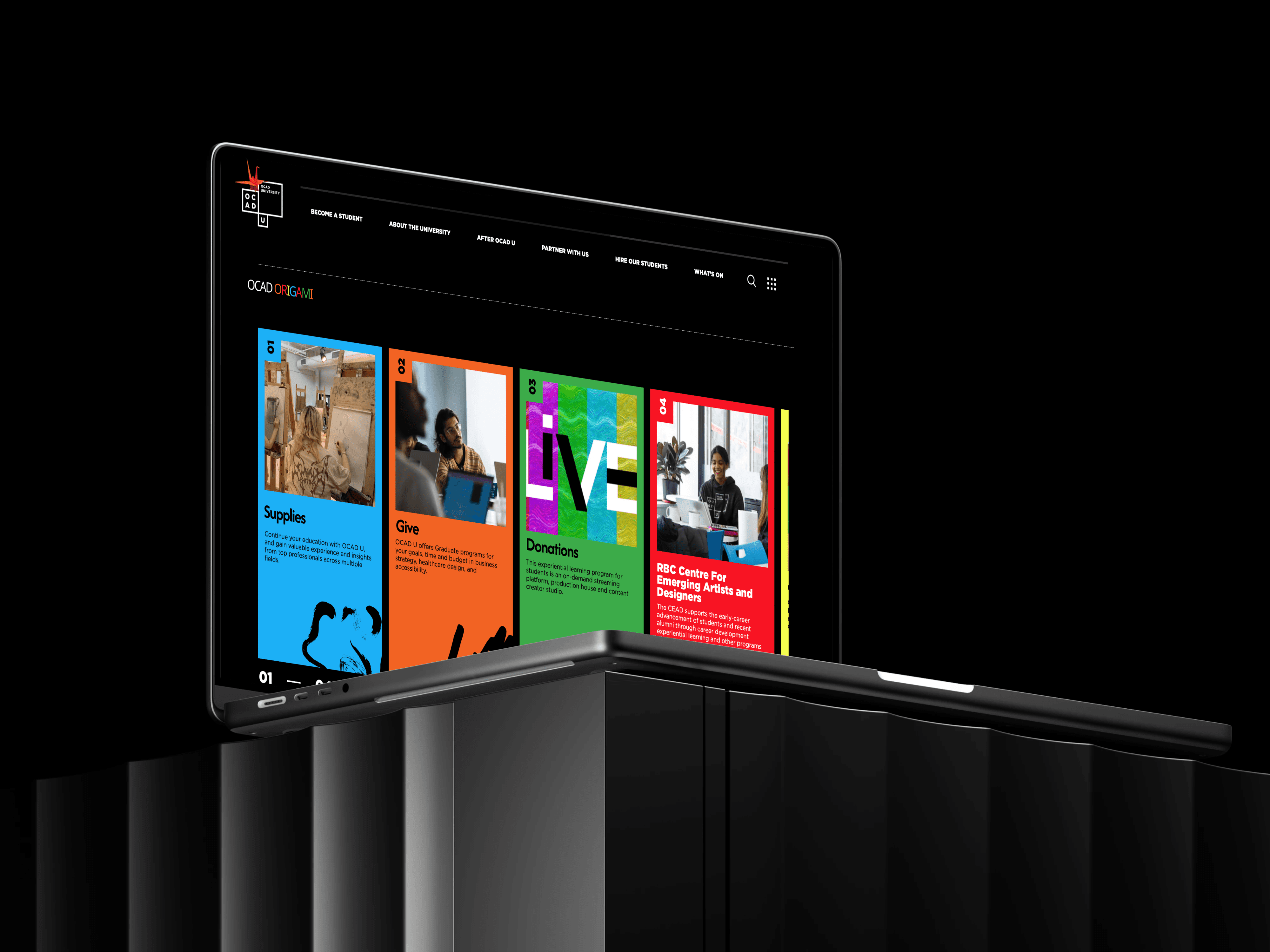
A web platform that transforms OCAD University's "Reuse Depot" into an organised, sustainable resource hub where students can discover and claim art materials.
Reviving the art of Book Clubs - Social media redefined
My Role: UX Designer & Researcher
Timeline: May – Aug 2024
Tools Used: Figma, Framer, Notion
Overview
01
The Problem
OCAD University has 2 small Reuse Depot corners on third and fourth floor where students can find donated art and craft materials—but it looks more like a junkyard than a resource —but it feels more cluttered than clearly organised as a resource. There's no system for inventory management, no way to know what's available before visiting, no information about material condition or donors, and no online presence whatsoever. Students waste time searching through disorganised piles, valuable materials go unnoticed, and the depot's sustainability mission is undermined by its chaotic, inaccessible state. For an art and design university that should champion resourcefulness and sustainability, this is a missed opportunity.
02
The Solution
OCAD Origami is a dedicated web platform integrated into OCAD's main website that brings order, visibility, and purpose to the Reuse Depot. Students can browse current inventory online, see material types and conditions, learn about donors, and even reserve items before visiting. The system transforms a neglected corner into a curated sustainable resource that reduces waste, saves students money, and strengthens OCAD's commitment to environmental responsibility—all while making the depot actually usable.
03
My Role
Led the complete UX/UI design process, from identifying the problem through user research to designing the information architecture, user flows, and final interface. I focused on understanding how art students search for materials, what information they need to make decisions, and how to design a system that works for both students (users) and depot managers (administrators).
Research & Discovery
User Research Methods:
Site Visit & Observation: Spent time at the existing Reuse Depot documenting its current state and observing student interactions
Student Interviews: Conducted 8 interviews with OCAD students about their material sourcing habits, sustainability attitudes, and depot experiences.
Stakeholder Discussions: Spoke with [facilities staff/sustainability coordinator] about depot operations and challenges.
Comparative Research: Analysed how other universities, makerspaces, and creative reuse centers manage similar programs
Material Audit: Cataloged typical item types, conditions, and donation patterns at the depot
Key Insights:
Unlike general thrift shopping, art students search by specific material types (canvas, acrylic paint, wood, fabric) for specific projects with deadlines.
Students were willing to use donated materials but needed to know condition upfront. Is that paint half-dried? Is the canvas stretched or rolled? Can those markers still write? Condition transparency builds trust and reduces wasted trips.
Competitive Analysis:
Existing platforms either lack material-specific organization (Buy Nothing, Freecycle), don't serve art students' unique needs (university surplus stores), or exist only as physical spaces without digital inventory systems (creative reuse centers)—Origami is the first to combine art-material categorization, condition transparency, and online searchability specifically for a university creative community.
Journey Mapping (Pain Points):
Current Journey (Reuse Depot)
1.Hear about depot from friend (maybe) → 2. Try to find it on campus → 3. Arrive to cluttered corner → 4. Dig through piles → 5. Maybe find something useful (probably not) → 6. Leave frustrated → 7. Buy new materials instead
Desired Journey (With Origami)
1.Need canvas for project → 2. Check OCAD Origami website → 3. Search "canvas" → 4. See 3 available canvases with photos, conditions, locations → 5. Reserve one → 6. Visit depot, pick up reserved item → 7. Complete project with free, sustainable material → 8. Return to donate leftover supplies
User Persona

Persona 1: The Budget-Conscious Student
"Art supplies are expensive. I'd love to find free materials if I knew what was available."
Age: 20, 2nd-year Illustration student
Lives on tight budget, always looking for ways to save
Environmentally conscious but prioritizes cost
Needs: Clear inventory, easy search by material type, reservation to ensure availability
Pain points: Can't afford to waste time on trips that don't yield materials; needs to know before going

Persona 2: The Experimental Creator
"I love working with found materials, but I need inspiration about what's possible."
Age: 23, 4th-year Sculpture student
Excited by constraints and unconventional materials
Enjoys sustainability aspect as part of artistic practice
Needs: Browse-friendly interface, visual inventory, material inspiration
Pain points: Current depot is overwhelming; wants to see possibilities, not dig through chaos

Persona 3: The Generous Donor
"I have materials left over from projects. I'd donate if I knew someone would actually use them."
Age: 33, Faculty member/ graduate student/ Alumni, artists outside of OCAD
Has accumulated materials over years
Wants materials to have second life, not go to landfill
Needs: Easy donation process, recognition for contribution, confidence items will be used
Pain points: No clear donation system; doesn't know if anyone actually uses the depot
Persona 4: The Depot Manager (Administrator)
"I want to help, but managing this manually is impossible."
A student volunteer or member of student union
Overwhelmed by lack of organization system
Wants depot to succeed but needs tools
Needs: Inventory management system, donation tracking, usage statistics
Pain points: Can't track what comes in/out; no way to measure impact; maintenance is reactive, not proactive
Define & Ideate
Design
Goals:
Make the Invisible Visible: Transform the depot from hidden chaos to discoverable resource through comprehensive online inventory.
Design for Two Users: Create seamless experiences for both students (finding/reserving) and administrators (managing inventory).
Prioritize Material-Specific Search: Art students think in material types—the taxonomy and filters must match their mental models.
Build Trust Through Transparency: Show condition, photos, and details upfront so students can make informed decisions remotely.
Encourage Sustainable Culture: Make reusing materials feel easy, responsible, and community-oriented, not like settling for scraps.
Brainstorming ideas
Photo requirements for each listing with condition notes
"Quick picks" for common searches (paint, canvas, paper)
QR codes on physical items linking to digital listings
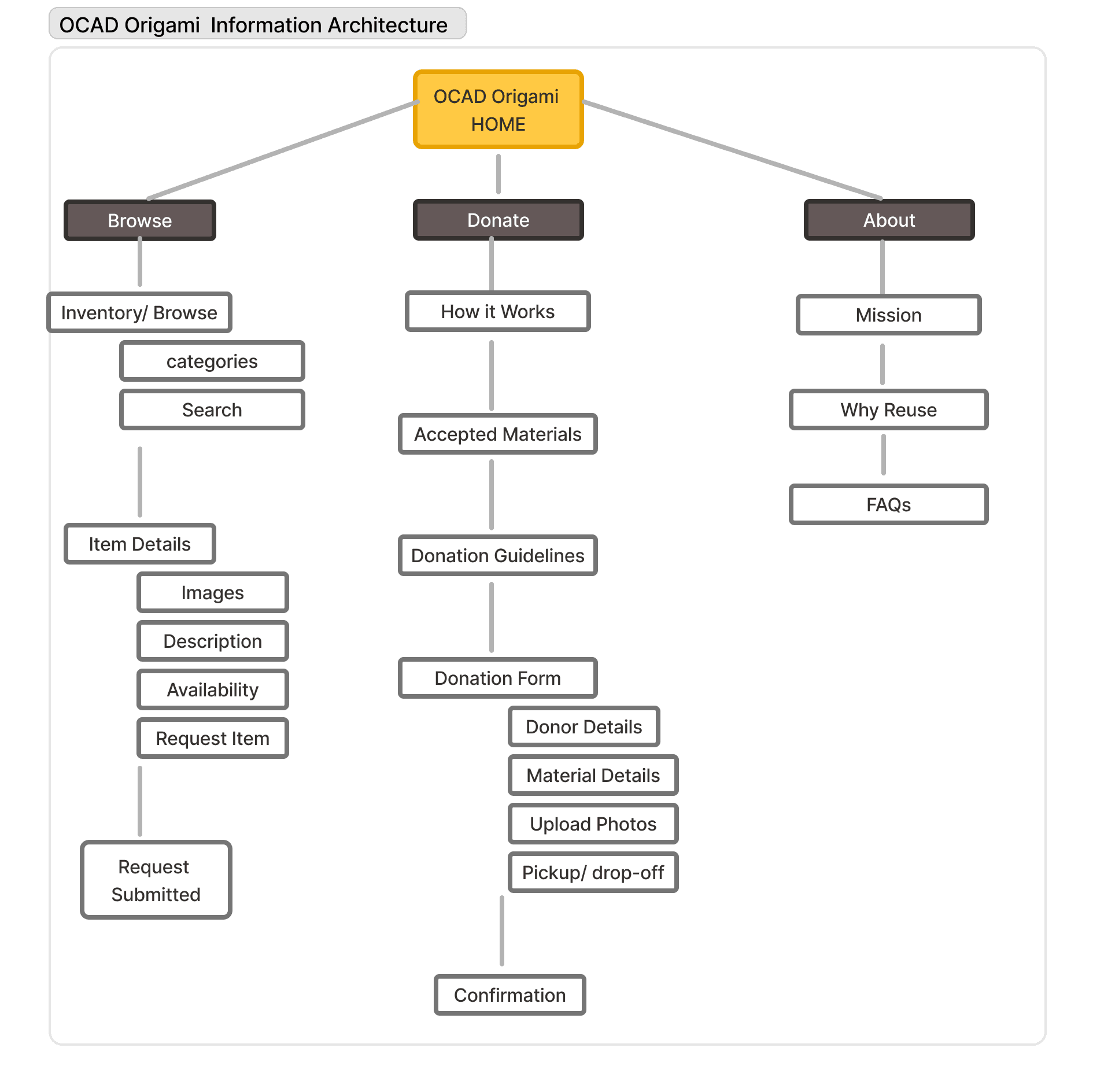
Information Architecture:
User Flows:
Student Browsing and Reserving: 1. Land on Origami homepage → 2. Search "acrylic paint" or browse Paint category → 3. View filtered results with photos → 4. Click item for details → 5. Check condition and quantity → 6. Click "Reserve" → 7. Log in with student ID → 8. Confirm reservation → 9. Receive confirmation email with pickup details
Design Solution
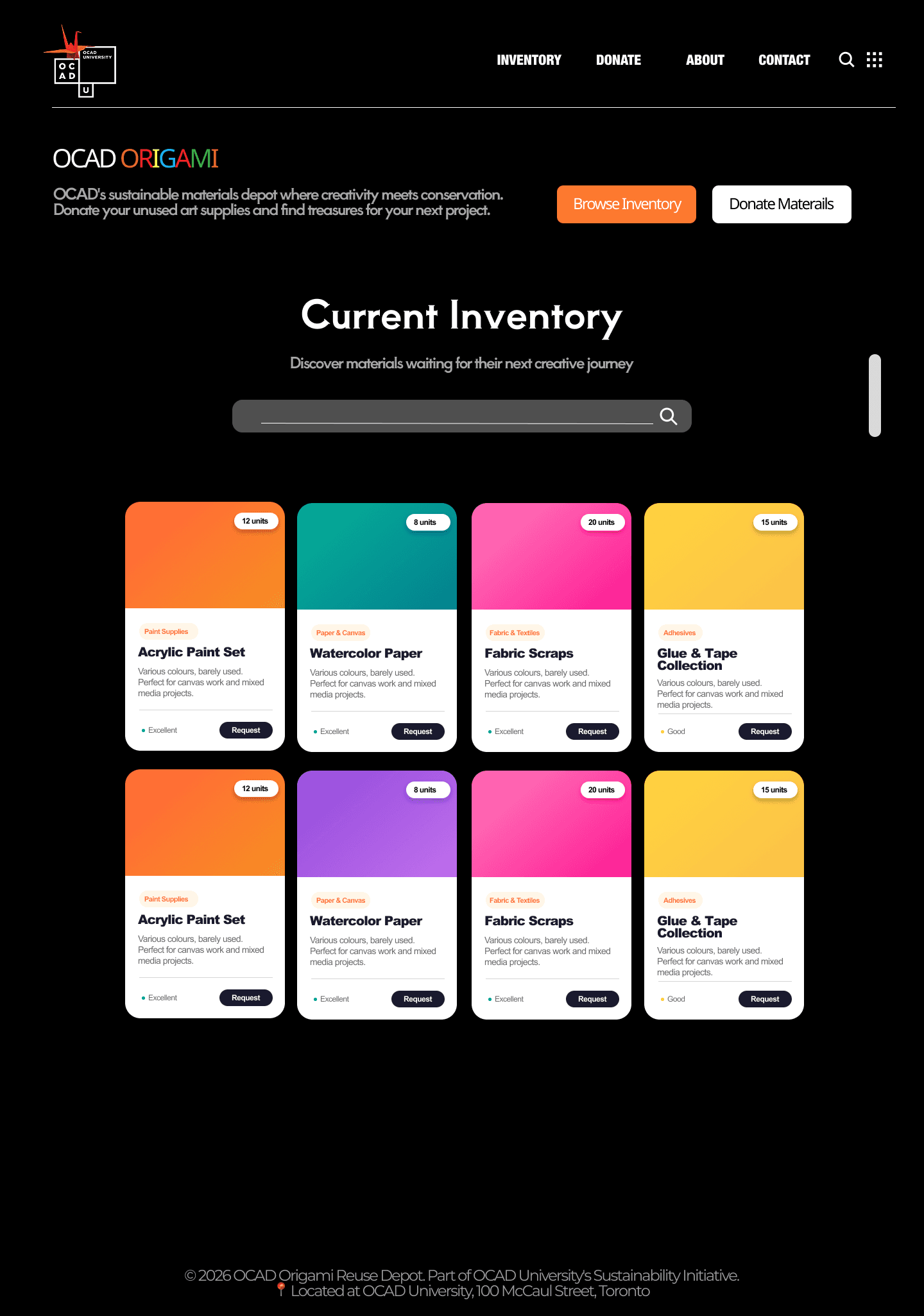
Browsing Current Inventory
The browse inventory screen supports exploratory discovery of available materials within the reuse depot. Items are presented in a clear, scannable grid, allowing users to quickly assess availability, category, and quantity without needing to open each item.
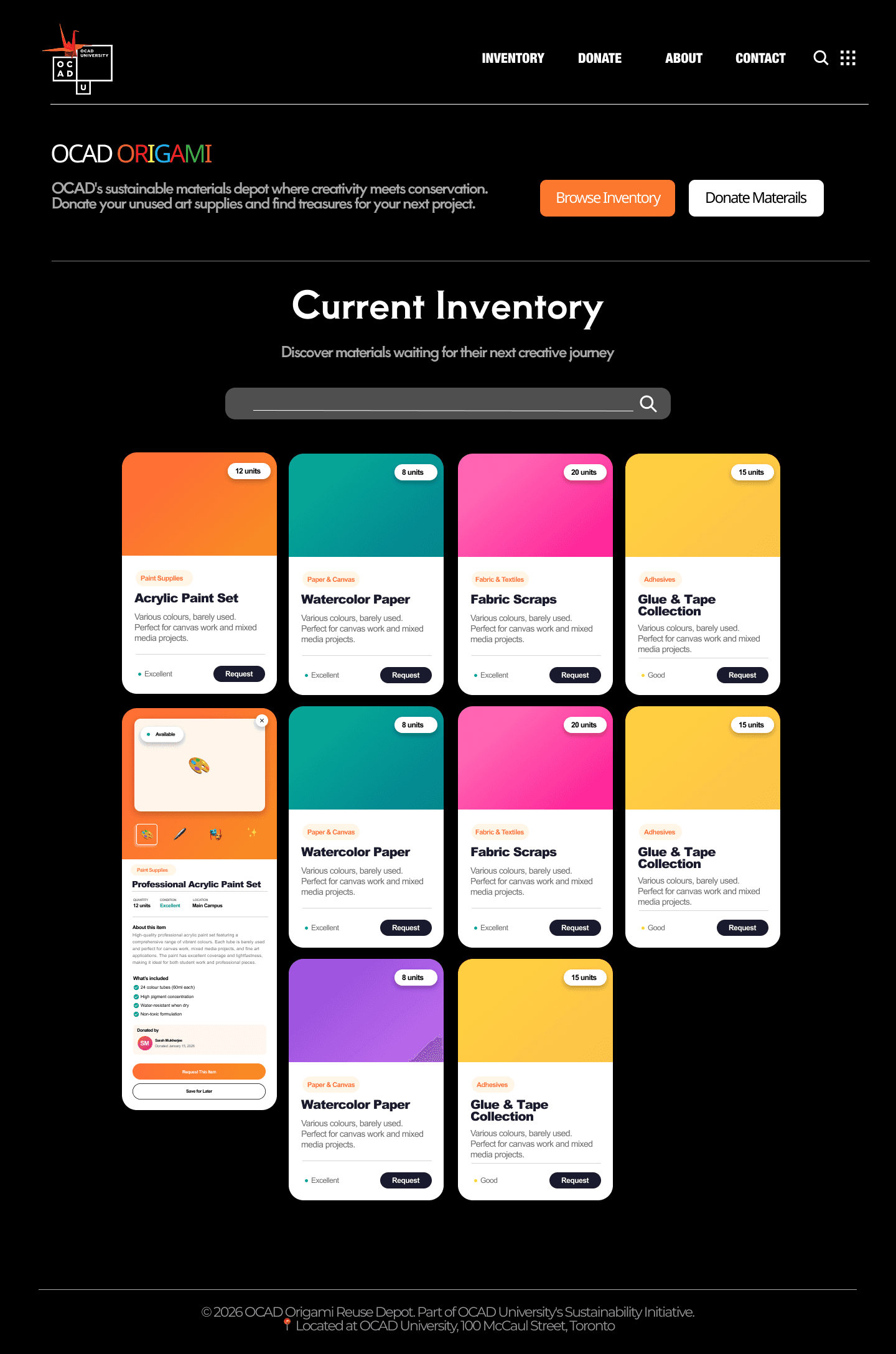
Browsing Current Inventory - expanded view
Provides detailed information about a material’s condition, availability, and pickup details to support informed requesting.
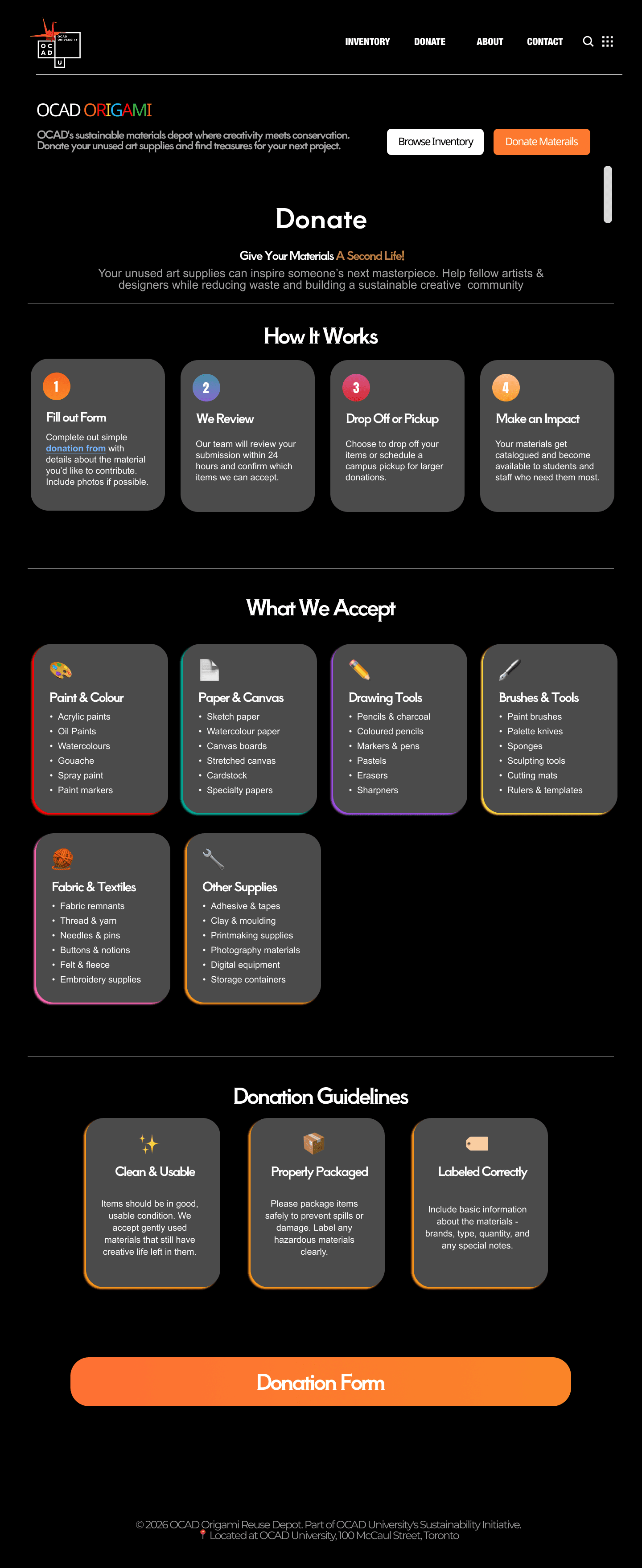
Donate
This screen enables users to contribute unused art and design materials to OCAD’s reuse depot through a guided, low-friction donation flow. The layout prioritizes clarity and ease by clearly explaining what can be donated, how the process works, and what happens after submission before users reach the form.
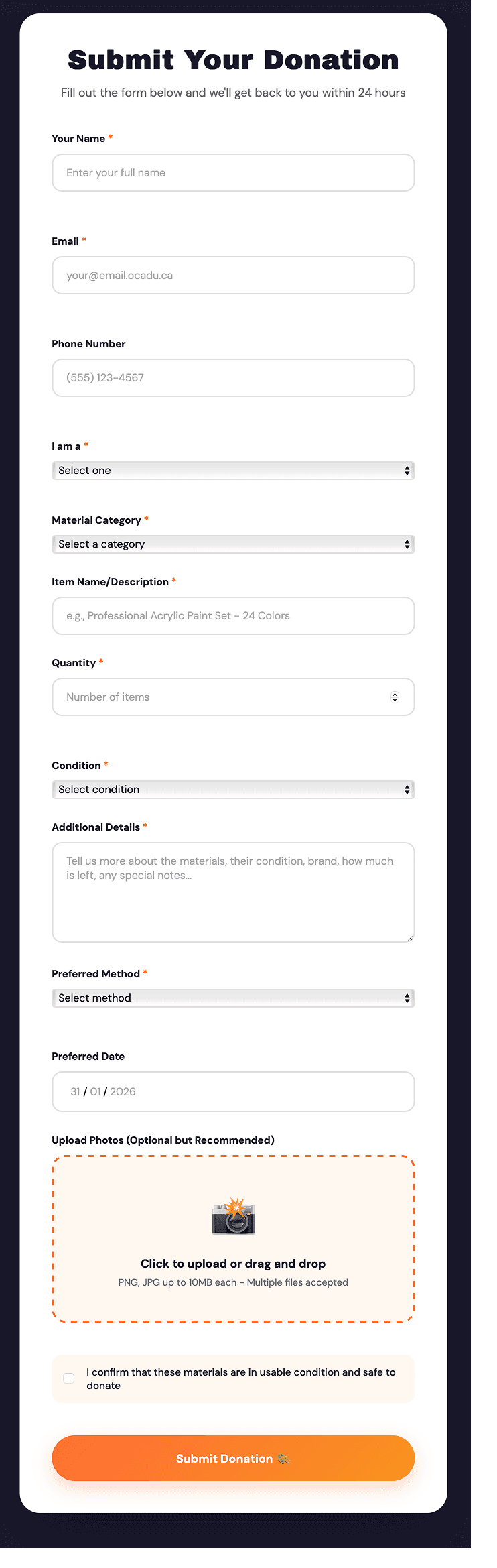
Donation Form
Collects essential donor and material details through a structured, low-friction submission flow.